Rebuilds & Repairs
Understanding vSAN Rebuilds and Repairs
vSAN Objects and Component Placement
VMware vSAN is an object-based distributed storage system that uses physical storage devices on each ESXi host in a cluster to contribute to the vSAN storage system. Virtual machines that live on vSAN storage are comprised of a number of storage objects. VMDKs, VM home namespace, VM swap areas, snapshot delta disks, and snapshot memory maps are all examples of storage objects in vSAN.
Each object consists of one or more components. The number of components that make up an object depends primarily on the size of the objects and the storage policy assigned to the object. The maximum size of a component is 255GB. If an object is larger than 255GB, it is split up into multiple components. For detailed information on vSAN Objects and Component placement go to storagehub.vmware.com.
The object in Figure 1 is a 700GB VMDK. A few observations:
- Because the maximum size of components is 255GB it will take 3 components (C1, C2, C3) to make one full copy of the object.
- The object has a VM storage policy of RAD-1 (mirror) and FTT=1. This policy requires two replicas of the object on separate hosts and a witness component acting as a tie-breaker.
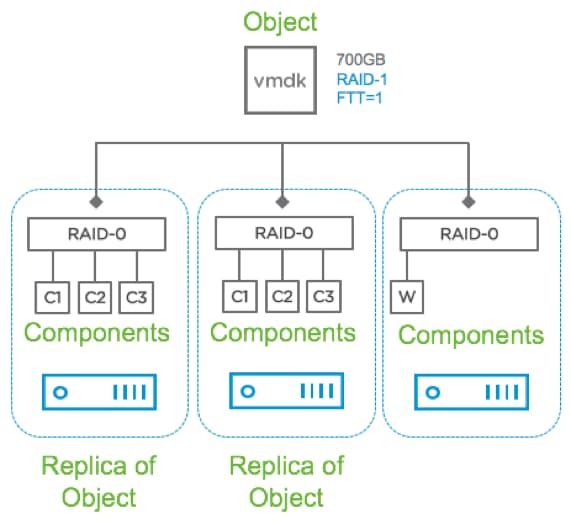 Figure 1: vSAN Objects and Components
vSAN Object Component States
A component has four possible states:
- Active: Accessible
- Absent: Inaccessible with no error codes sensed (host or network outage, or maintenance mode with no data evacuation)
- Degraded: Inaccessible with error codes sensed. (i.e. device failure) In this case the rebuild will begin immediately
- Active-Stale: Sequence numbers of components not up to date (i.e. multiple host failures with one coming back up online.
In the story above, the customer had several data objects on his host:
- 2 objects with FTT=0
- 108 objects with FTT=1 (mirror)
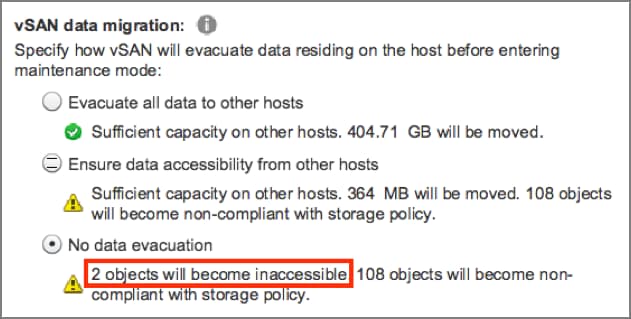 Figure 2: vSAN Maintenance Mode Options
When he put the host in maintenance mode and chose No Data Evacuation, he failed to heed the “What-if” information and as a result of the absent objects, the FTT=0 VMs were unable to tolerate the “failure” and were inaccessible until the host returned. The FTT=1 VMs were still accessible but non-compliant with their storage policy because they could not tolerate an additional failure.
vSAN Rebuild Process
When vSAN components are offline they are marked “absent” and colored orange in the vSAN user interface. vSAN waits 60 minutes by default before starting the repair operation. vSAN has this delay as many issues are transient. In other words, vSAN expects absent components to be back online in a reasonable amount of time and we want to avoid copying large quantities of data unless it is necessary. An example is a host being temporarily offline due to an unplanned reboot.
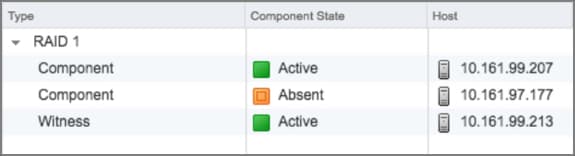 Figure 3: Component State
vSAN will begin the repair process for absent components after 60 minutes to restore redundancy. For example, an object such as a virtual disk (VMDK file) protected by a RAID-1 mirroring storage policy will create a second mirror copy from the healthy copy. This process can take a considerable amount of time depending on how much data must be copied. The rebuild process continues even if the absent copy comes back online in versions of vSAN prior to 6.6.
Repair Objects Immediately
There are some scenarios in which a host will be absent for longer than 60 minutes. The affected VMs are still accessible however non-compliant with their storage policies. More importantly in the case of FTT=1, until a rebuild occurs vSAN will not be able to tolerate additional failures. If this is the case, you may choose to repair the objects immediately. This option will resynchronize the absent objects on available hosts in the vSAN cluster.
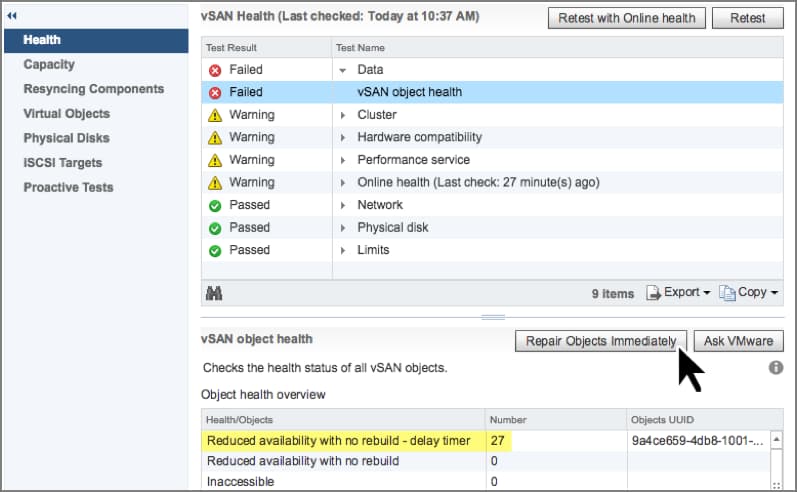 Figure 4: Repair Objects Immediately